学习资料
我把 GRE 的考试界面搬到了错题本上
这是我第二次备考 GRE 了,他们都说做得多不如做得精,所以过去的三五天完全都在重做一遍第一次备考期间的错题,竟然也有好几百题值得精刷。考满分有很贴心的“错题本”功能,但错题本里看错题并不是很方便,我个人的习惯也是喜欢自己整理起来错题并加一些注释。另外,我对美观有算是比较独特的追求,也希望错题以考试同样的形式呈现;算是搞了小一会儿代码,故简单分享下。我会分 Verbal 填空题和 Quant 两部分分别介绍(阅读题整理到错题本就比较不必要了,更多是经验的积累)。
这篇内容可能很无聊,也可能挺有意思,但无论如何希望对大家有帮助 🌈
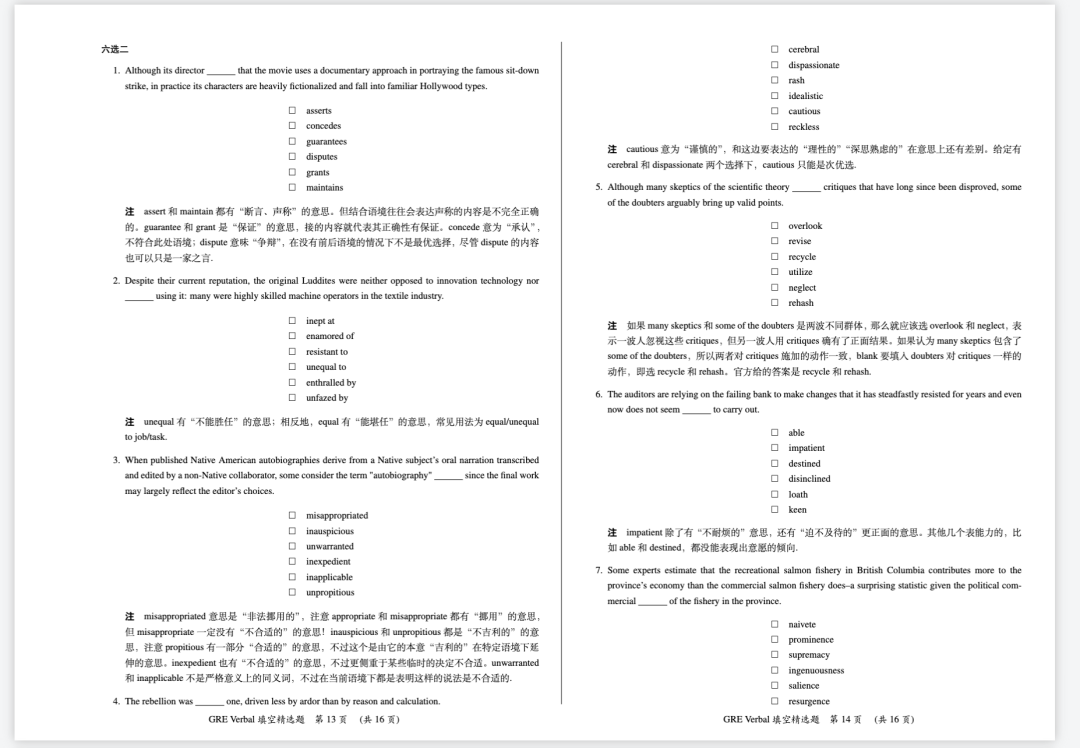
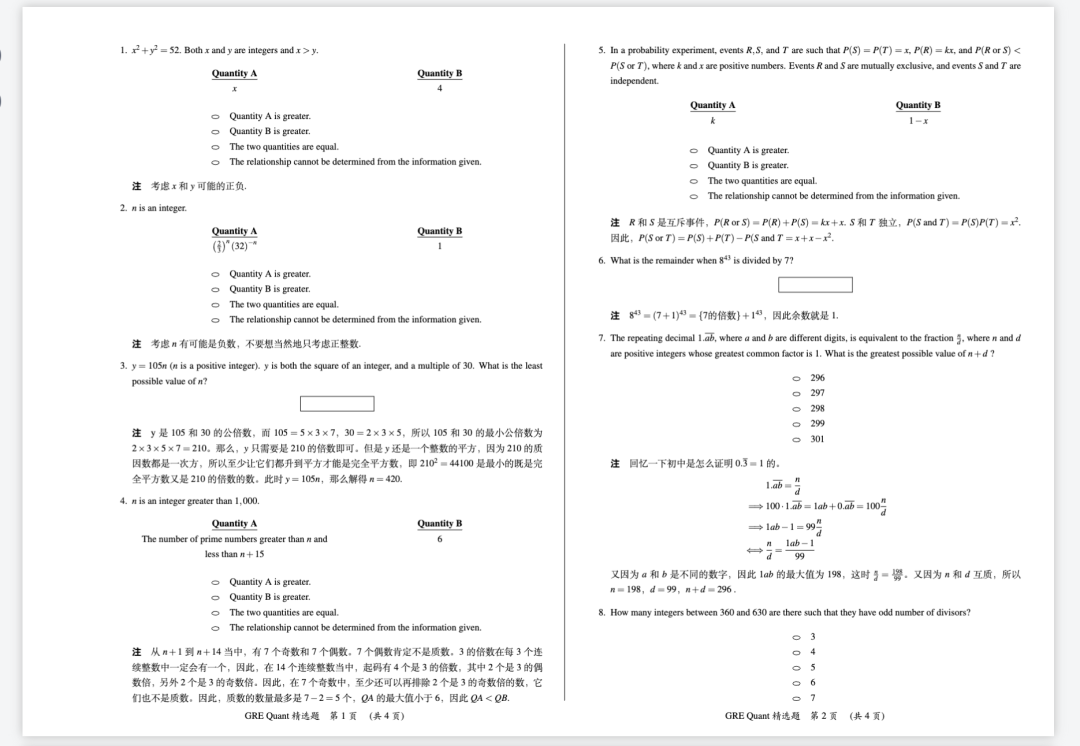
Verbal 填空题
Verbal 填空题有三类题型:
- 五选一
- 多空题(两空和三空)
- 六选二
五选一和多空题本质上是一样的,都是把选项放在表格里,只不过是有几列、一列有几个选项之间的差别。
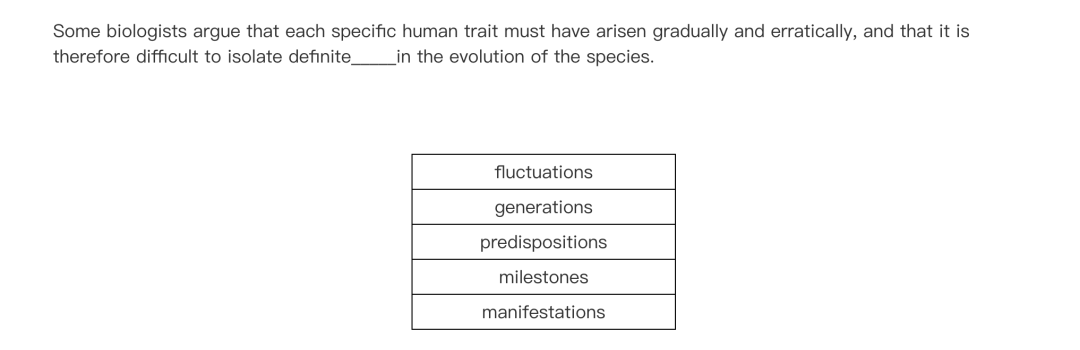
五选一
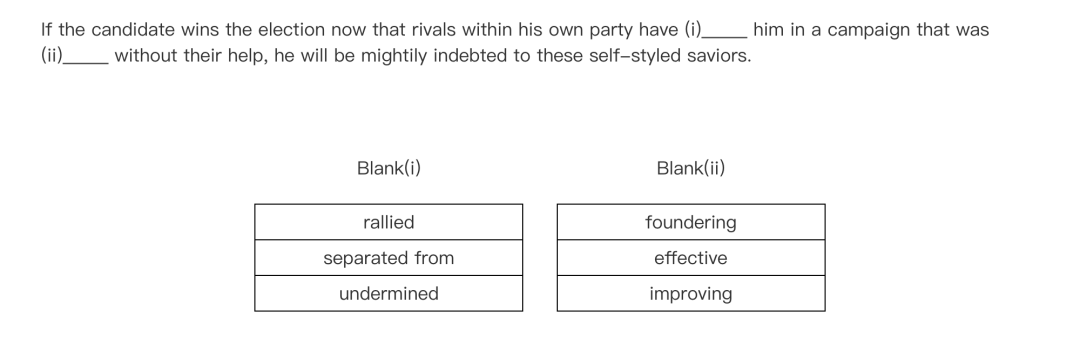
双空题
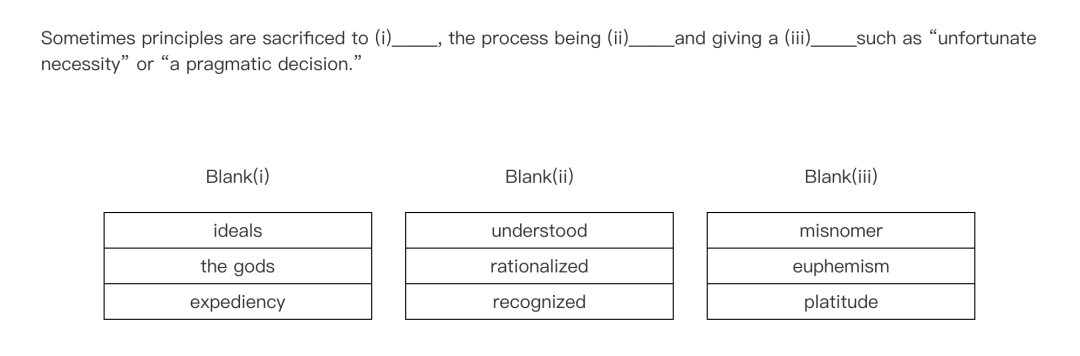
三空题
为了把选项装在表格里,定义一个 \choices 命令,接收五个参数。如果五个参数都有,那么就放五行(相当于五选一题);如果只有前三个参数有,后两个为空,则放三行(相当于多空题)。
\newcommand{\choices}[5]{%
    \ifx\relax#4\relax % 检查第四个参数是否未定义(即 \relax)
        % 如果第四个参数未定义,创建一个三参数的表格
        \begin{tabular}{|>{\centering\arraybackslash}m{0.7\linewidth}|}
        \hline
        #1 \\
        \hline
        #2 \\
        \hline
        #3 \\
        \hline
        \end{tabular}
    \else % 如果第四个参数已定义,创建一个五参数的表格
        \begin{tabular}{|>{\centering\arraybackslash}m{0.4\linewidth}|}
        \hline
        #1 \\
        \hline
        #2 \\
        \hline
        #3 \\
        \hline
        #4 \\
        \hline
        #5 \\
        \hline
        \end{tabular}
    \fi
}
之后需要根据题目类型决定放几列、怎么放。定义 \multiblank 命令,接收四个参数,第一个参数说明这道题有几空(为 1 即为五选一,2 或 3 就分别是两空和三空的多空题,六选二提醒后续会说),这会决定走哪套代码,即几个选项要怎么排布。后面三个参数就取决于具体题型往里头放 \choices{}{}{}{}{} 即可。
具体的实现就不在这里说了,有兴趣的可以看代码,其实并不算复杂,就是塞了 tabularx 环境,细节上设置选项陈列关于中间对齐,表格内的内容也要居中。
\newcommand{\multiblank}[4]{%
    \ifnum#1=1
        \begin{center}
            \begin{tabularx}{0.4\textwidth}{*{1}{>{\centering\arraybackslash}X}}
            {#2}
            \end{tabularx}
        \end{center}
    \else
        \ifnum#1=2 % 如果第一个参数是 2
            \begin{center}
                \begin{tabularx}{0.4\textwidth}{*{2}{>{\centering\arraybackslash}X}}
                Blank (i) & Blank (ii) \\
                {#2} & {#3}
                \end{tabularx}
            \end{center}
        \else % 如果第一个参数不是 2
            \ifnum#1=3
                \begin{center}
                    \begin{tabularx}{0.4\textwidth}{*{3}{>{\centering\arraybackslash}X}}
                    Blank (i) & Blank (ii) & Blank (iii) \\
                    {#2} & {#3} & {#4}
                    \end{tabularx}
                \end{center}
            \fi
        \fi
    \fi
}
额外再定义一个下划线命令:
\newcommand{\blank}[1]{\underline{\tiankongdaan{\qquad~}}}
以及一个“注”命令用来写自己的解析:
\newcommand{\note}[1]{{\heiti\textbf{注\hspace{1em}}}#1.}
把整个错题本的正文都放在 enumerate 的环境之下,这样自然会有题号计数,每道题用 \item 打头。
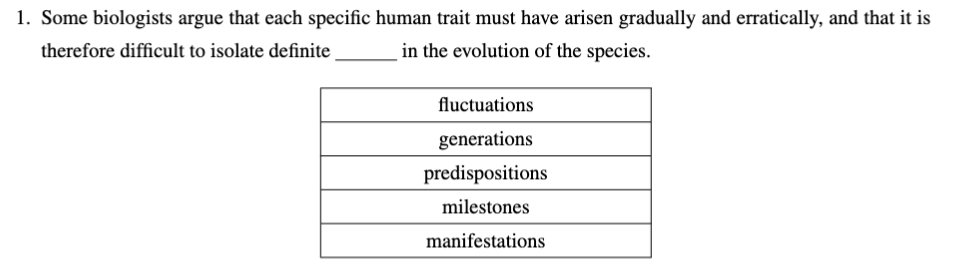
五选一
\item Some biologists argue that each specific human trait must have arisen gradually and erratically, and that it is therefore difficult to isolate definite \blank{} in the evolution of the species.
\multiblank{1}{\choices{fluctuations}{generations}{predispositions}{milestones}{manifestations}}{}{}
呈现的效果如下
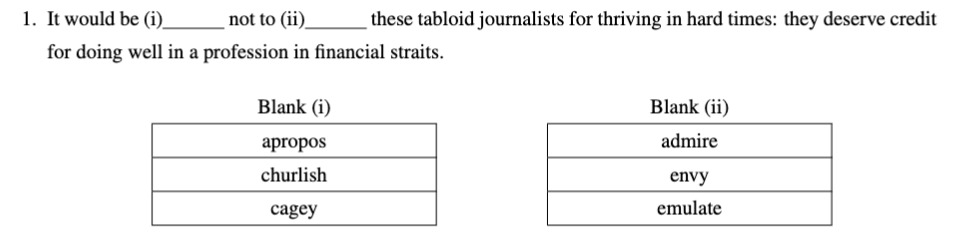
双空题
\item It would be (i)\blank{} not to (ii)\blank{} these tabloid journalists for thriving in hard times: they deserve credit for doing well in a profession in financial straits.
\multiblank{2}{\choices{apropos}{churlish}{cagey}{}{}}{\choices{admire}{envy}{emulate}{}{}}{}
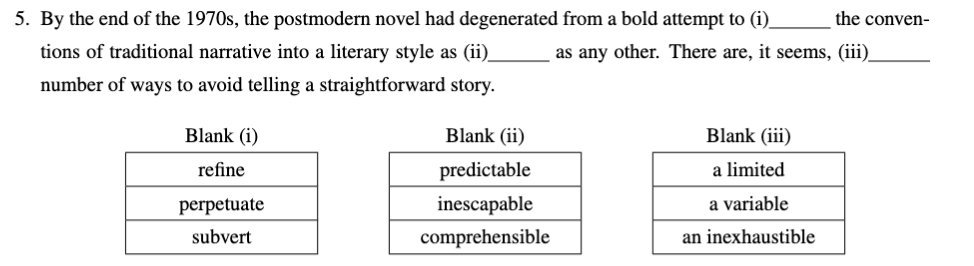
三空题
\item By the end of the 1970s, the postmodern novel had degenerated from a bold attempt to (i)\blank{} the conventions of traditional narrative into a literary style as (ii)\blank{} as any other. There are, it seems, (iii)\blank{} number of ways to avoid telling a straightforward story.
\multiblank{3}{\choices{refine}{perpetuate}{subvert}{}{}}{\choices{predictable}{inescapable}{comprehensible}{}{}}{\choices{a limited}{a variable}{an inexhaustible}{}{}}{}{}
六选二
因为呈现的形式不同于其它题,六选二题单独定义呈现命令。
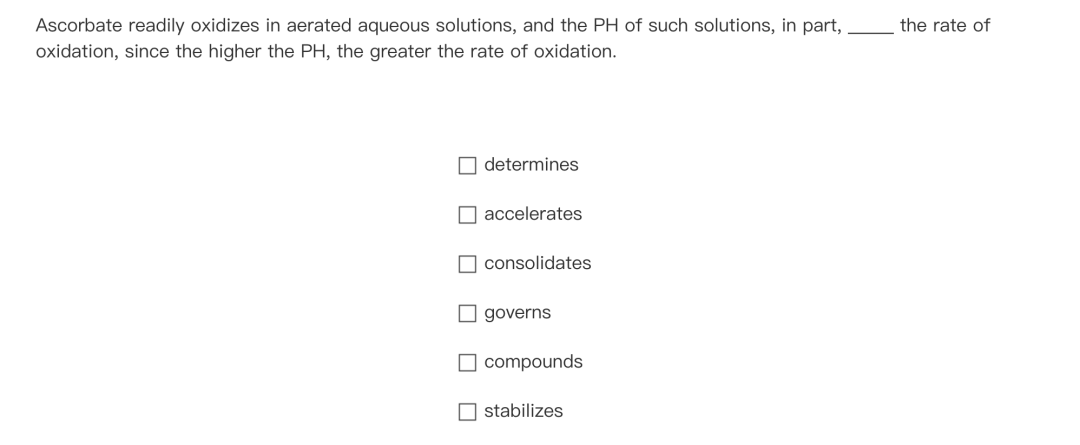
六选二
乍一眼来看,似乎用一个 itemize 环境(并且让其居中,然后再改变 bullet point 样式为 \square)就可以实现,但这样有一个问题,就是 bullet points 的位置可能因为选项的长度而有改变。我希望实现的是无论如何 bullet points 都在固定的位置(即有固定的横坐标),故还是用到了 tabularx 环境,相当于把方块和选项当作两列。如下定义六选二提醒的呈现命令 \senequiv(取这个名字是因为这类题实际上叫 sentence equivalence):
\newcommand{\senequiv}[6]{
\begin{center}
\begin{tabularx}{\linewidth}{>{\raggedleft\arraybackslash}p{0.4\linewidth} p{0.45\linewidth}}
    $\square$ & {#1} \\
    $\square$ & {#2} \\
    $\square$ & {#3} \\
    $\square$ & {#4} \\
    $\square$ & {#5} \\
    $\square$ & {#6} \\
\end{tabularx}
\end{center}
}
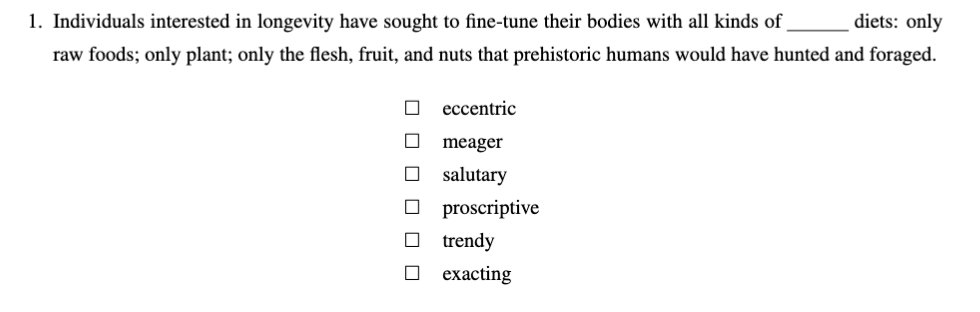
使用起来效果如下:
\item Individuals interested in longevity have sought to fine-tune their bodies with all kinds of \blank{} diets: only raw foods; only plant; only the flesh, fruit, and nuts that prehistoric humans would have hunted and foraged.
\senequiv{eccentric}{meager}{salutary}{proscriptive}{trendy}{exacting}
Quant
数学大致来说有两类题型,一类是选择题,一类是填空题。
选择题
选择题可以再额外分出两小类:
- 比大小
- 一般的选择题
一般选择题
一般的选择题里也有多选题,由于多选题比较少且一般不难,实现方法在上面的六选二也说过了,这边就不再额外介绍。
GRE 单选题选项的 bullet point 是一个椭圆,可惜的是 \LaTeX 里并没有直接的椭圆的命令,这里用到 tikz 包画一个就好。定义命令 \oval 为:
\usepackage{tikz}
\renewcommand{\oval}{
\begin{tikzpicture}
  \draw (0,0) ellipse (.15cm and .075cm);
\end{tikzpicture}
}
之后定义选项呈现的命令 \options(和 \choices 不同,但和 \senequiv 的思路基本相同,注意到一般选择题都是五个选项):
\newcommand{\options}[5]{
\begin{center}
\begin{tabularx}{\linewidth}{>{\raggedleft\arraybackslash}p{0.45\linewidth} p{0.5\linewidth}}
    \oval & {#1} \\
    \oval & {#2} \\
    \oval & {#3} \\
    \oval & {#4} \\
    \oval & {#5}
\end{tabularx}
\end{center}
}
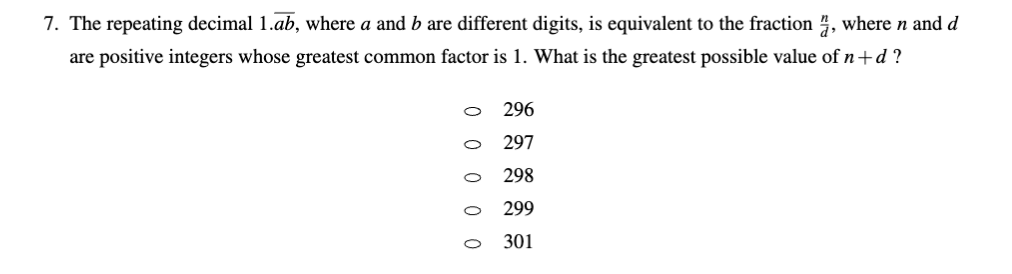
这样的效果如下:
\item The repeating decimal \( 1.\overline{ab} \), where \( a \) and \( b \) are different digits, is equivalent to the fraction \( \frac{n}{d} \), where \( n \) and \( d \) are positive integers whose greatest common factor is 1. What is the greatest possible value of \( n + d \) ?
\options{296}{297}{298}{299}{301}
比大小
比大小其实也是选择题的一种,它们出现频繁,格式都是固定的,选项也是一样的,所以单独定义一类以图方便。
定义命令 \quantities,接收两个参数分别作为 Quantity A 和 Quantity B,用于比大小题从 Quantity A 一直到四个选项的呈现(题干信息额外写):
\newcommand{\quantities}[2]{
\begin{center}
    \begin{tabularx}{\linewidth}{*{2}{>{\centering\arraybackslash}X}}
    \textbf{\underline{Quantity A}} & \textbf{\underline{Quantity B}}\\
    {#1} & {#2}
    \end{tabularx}
\end{center}

\begin{center}
\begin{tabularx}{\linewidth}{>{\raggedleft\arraybackslash}p{0.2\linewidth} p{0.8\linewidth}}
    \oval & Quantity A is greater. \\
    \oval & Quantity B is greater. \\
    \oval & The two quantities are equal. \\
    \oval & The relationship cannot be determined from the information given.
\end{tabularx}
\end{center}
}
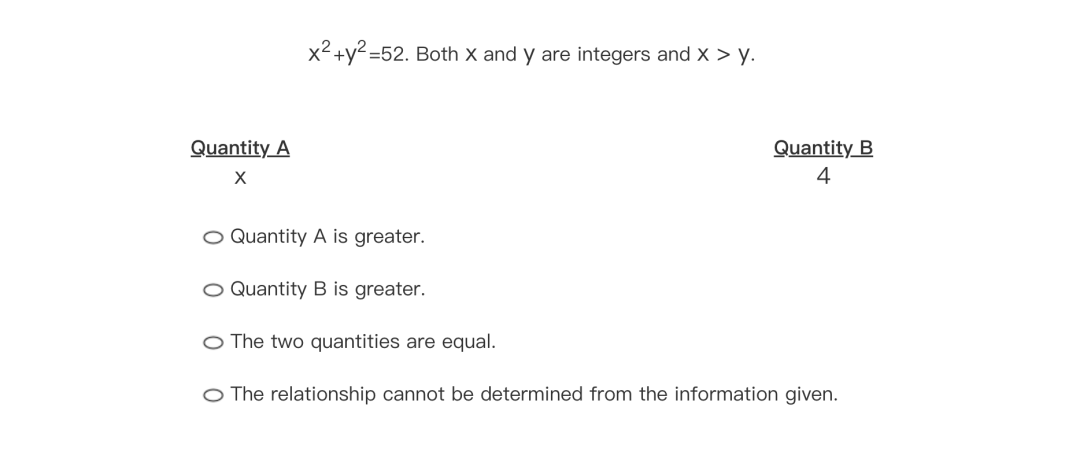
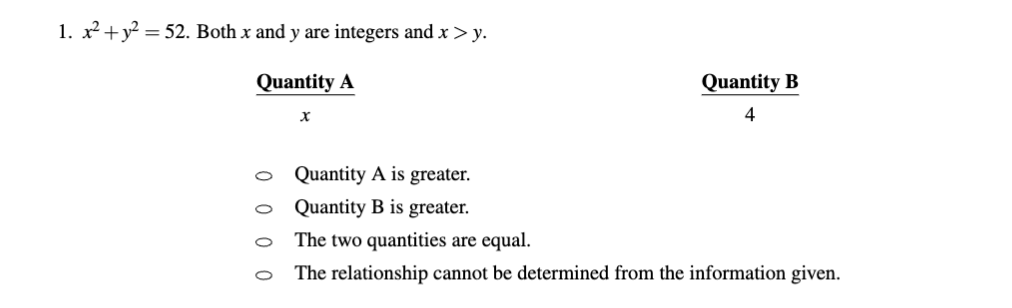
呈现的效果如下:
\item $x^2+y^2 = 52$. Both $x$ and $y$ are integers and $x>y$.
\quantities{$x$}{$4$}
填空题
填空题其实没有什么难度,题面的叙述就是一般的正文,只要考虑添加一个长方形框用来输入答案即可。
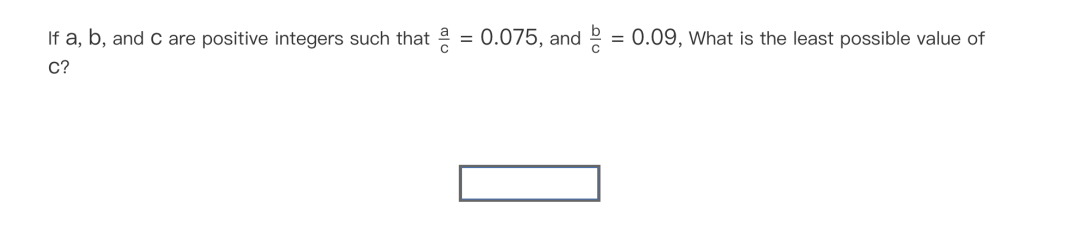
这个长方形框还是用 tikz 画一个就好。定义一个命令 \field 用于生成长方形框:
\newcommand{\field}{
\begin{center}
\begin{tikzpicture}
  \draw (0,0) rectangle (3,.6);
\end{tikzpicture}
\end{center}
}
以上面那题为例,效果为:
\item If \( a \), \( b \), and \( c \) are positive integers such that \( \dfrac{a}{c} = 0.075 \), and \( \dfrac{b}{c} = 0.09 \), what is the least possible value of \( c \)?
\field

希望对大家有帮助 🌈
完整模板源码 + 编译指南
上面讲的每个宏命令我都打包成了三套独立的 .sty 文件,跟主 .tex 文件配对发布。你下载下来就能直接编译出一份“考试感”完全到位的错题本 PDF。
三套模板 + 题面 / 答案双版本下载
每套都有“题面版”(空白填空 / 圆圈选项,可打印当试卷用)和“答案版”(填空里直接显示正确答案,复习用),由 .sty 包的 [ans] 选项切换——同一份题目源代码,两个 PDF。
- Quant 数学错题本:题面 / 答案的
.tex源码 + 数学\options{}{}{}{}{}/\quantities{A}{B}/\field等宏 → PDF 题面版 · PDF 答案版 · .tex 源 · .sty 模板 - Verbal 填空错题本:覆盖五选一 / 多空题 / 六选二三种题型,
\choices{}{}{}{}{}/\multiblank{N}{}{}{}/\senequiv{}{}{}{}{}{}三宏 → PDF 题面版 · PDF 答案版 · .tex 源 · .sty 模板 - Verbal 阅读错题本:长文章 + 题组结构,配套适用于阅读理解题型的版式 → PDF 题面版 · PDF 答案版 · .tex 源 · .sty 模板
[ans] 答案版切换:一行改动出两份 PDF
.sty 包里有这一段:
\def\tiankongdaan#1{\makebox[3em][c]{#1}}
\newcommand{\blank}[1]{\underline{\tiankongdaan{\qquad~}}}
\DeclareOption{ans}{\renewcommand{\blank}[1]{\,\underline{#1}\,}}
\ProcessOptions
- 默认(不带选项):
\blank{420}渲染成一段下划线占位_______,看上去就是空着等你填 - 带
[ans]选项:\usepackage[ans]{GEEexam_Quant},同一句\blank{420}渲染成带答案的下划线_420_
也就是说,题目源代码只写一遍——\blank{420}、\blank{420.0} 这种把答案写在大括号里——然后用两份 .tex 切换:
% 题面版 GRE-Quant.tex
\usepackage{GEEexam_Quant}

% 答案版 GRE-Quant-Ans.tex(仅改第一行)
\usepackage[ans]{GEEexam_Quant}
考前打印题面版掐时间做,考后翻答案版对照解析——是错题本最理想的双轨工作流。
为什么是 A3 双栏横排
.sty 文件第二段定义了纸张:
\geometry{a3paper,twocolumn,landscape,hmargin={3.5cm,1.3cm},
          vmargin={1.5cm,1.5cm},footskip=0.75cm,headsep=0.25cm}
A3 + 横向 + 双栏——这就是 GRE 真实考试机考界面的“宽屏感”。打印出来折一下就跟两张 A4 横排并列一样。配上:
\fancyfoot[CE,CO]{\kaishu{}GRE Quant 精选题\quad 第\refstepcounter{fox}\thefoo\refstepcounter{foo}页 \quad (共~\ref{LastFox}~页)\hspace*{13cm} ...}
页脚每页“第 N 页 / 共 X 页”双栏对称——你打开 PDF 翻页时跟考试界面的“Question N of M”几乎一样的视觉锚点。
如果你不需要“考场仿真”只想要正常 A4 单栏,把 \geometry{...} 那行改成:
\geometry{a4paper,margin=2cm}
\setlength{\columnsep}{0pt}
并去掉 twocolumn 选项即可。
编译命令
模板用了中文字体(ctex 包)和中文页脚,必须用 xelatex 而不是 pdflatex:
cd files/gre/source/quant/
xelatex GRE-Quant.tex          # 出题面版
xelatex GRE-Quant-Ans.tex      # 出答案版
页脚里的 第 N 页 (共 X 页) 用了 \ref{LastFox} 跨编译引用,第一次跑会报 LastFox 未定义 —— 再跑一次 xelatex 就好(pandoc / latexmk 也是同样的两遍 pattern)。
或者直接用 latexmk:
latexmk -xelatex GRE-Quant.tex     # 自动判断要不要再编译
latexmk -xelatex -c GRE-Quant.tex  # 清理中间产物
怎么自己改造模板
如果你想做的是别的考试错题本(雅思 / SAT / 国内考研),把三件事改了就基本能复用:
- 页脚标题:搜
.sty里的\fancyfoot[CE,CO]{...GRE Quant 精选题...},把字符串换成你的考试名; - 选项格式:
\options是 5 选 1(数学)、\choices是 3 / 5 选 1(语文填空)、\senequiv是 6 选 2。你的题型如果不在这里,参照同一套tabularx写法新加一个宏; - 答案占位:核心是
\blank{...}+\DeclareOption{ans}那段。任何“出题时是空、有答案时显示”的位置都可以套用这个模式。
错题本只是个用例,模板真正的价值是把“打印题面”和“翻看答案”用同一份源代码做出来——这件事在做任何长期复习本(考研政治、CPA、医师执照等)都用得上。
希望对大家有帮助 🌈🌈
存入收藏夹
选一个收藏夹归类;不选就留在「默认收藏夹」。